Key takeaways
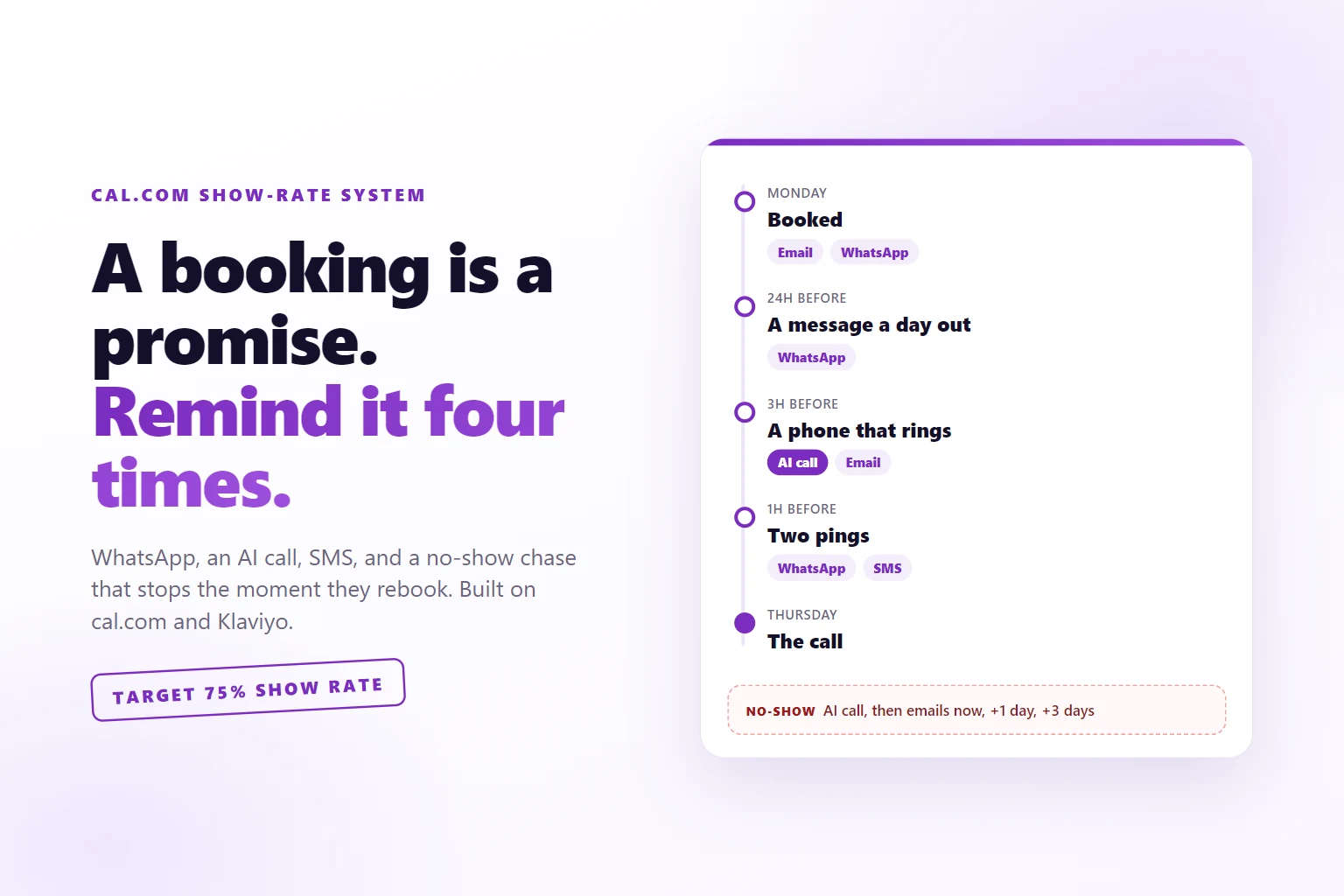
- A booking is a promise made on a good day. Between the click and the call it needs four touches, and the channel should get louder as the call gets closer.
- Ask your questions on the page before the calendar. The booking form carries the answers in, with name, email and both phone numbers prefilled and locked.
- An AI call three hours out has one job: confirm the call or move it. Moving a booking beats losing it, and the call never talks price.
- A no-show is an event like any other. Sign it, forward it to Klaviyo, and chase with three emails that stop the moment the person rebooks.
- Read the traps before you build: fixed WhatsApp templates, an AI number field you cannot hide, and no automatic no-show on Google Meet.
A booked call show-rate system is everything that runs between the booking and the call: a short form that collects the right phone numbers, reminders on four channels timed to the meeting, an AI call that confirms or moves the slot, and a no-show branch that calls and emails until the person rebooks.
Someone clicks your ad, reads your page, picks a time and books a sales call. You get the notification. You feel great about it. Then the call comes, you sit in the room with your coffee, and nobody joins.
That is not a lead problem. They wanted the call on Monday. By Thursday they have forgotten what they booked, why, and with whom. The usual cal.com setup sends one confirmation email and maybe one reminder email, and both land in the same inbox they stopped reading on Tuesday.
So I built the part that runs after the booking. It went live on 18 October 2026, on cal.com and Klaviyo, with one small Cloudflare Worker in between. The target is a 75% show rate. I do not have a measured rate yet, because the system is days old, and I will publish the number when there is one worth publishing.
This page is written to be followed: by you, or by Claude Code pointed at the URL.
What you are building
Four parts. Three of them live inside tools you probably already pay for.
- A hidden cal.com event that only the funnel links to, with a short booking form that collects a WhatsApp number and a number for the AI to call.
- A reminder cadence of cal.com workflows: messages, an AI phone call and an SMS, timed backwards from the start of the call.
- A no-show branch: an AI call the moment the attendee is marked as a no-show, plus three emails over three days.
- A bridge: a Cloudflare Worker that checks every cal.com webhook is really from cal.com, then pushes it into Klaviyo as an event the email flows can hang off.
Here is the whole cadence in one table, so you can see the shape before the steps.
| when | what goes out | who sends it |
|---|---|---|
| on booking | confirmation email, WhatsApp | cal.com |
| 24 hours before | cal.com | |
| 3 hours before | AI confirmation call, reminder email | cal.com (Cal.ai) |
| 1 hour before | WhatsApp, SMS | cal.com |
| on reschedule, on cancel | cal.com | |
| on no-show | AI call | cal.com (Cal.ai) |
| on no-show, then +1 day, +3 days | three emails | Klaviyo |
Why one reminder email is not a system
The standard answer to no-shows is “send a reminder”. Fine. Which channel, when, and what happens when it does not work?
One email the day before reminds people who were coming anyway. The person you are losing booked in a burst of motivation, then had a week. Your email is message forty in a pile.
So the cadence escalates. A day out, a WhatsApp, because that is the app people actually open. Three hours out, a phone call, because a ringing phone gets an answer even if the answer is “can we do Friday”. One hour out, WhatsApp and SMS together, because the SMS still lands when someone is on a train with no data. Each touch is louder than the one before it, and each one makes it easier to move the call than to skip it.
The other half is what happens after a no-show. Most setups do nothing. The slot is gone, the person feels slightly embarrassed, and embarrassed people do not rebook on their own. They need a door held open twice, without a lecture.
Step 1: a hidden event with a short form
Duplicate your existing sales call event in cal.com and hide it from your public profile. Mine is called “Start here”, 30 minutes, Google Meet, and the only way to reach it is the link at the end of the funnel. Nobody stumbles onto it from your profile page, so everyone who books it went through the page first.
Name it for the person booking. Mine is “Start here” on the page, in the messages and on the phone, because whatever you call it internally leaks into every reminder if you let it.
Then cut the booking form to the bone. The questions that decide whether a call makes sense live on the page before the calendar, not in the form. Mine asks for:
- name and email
- a WhatsApp number, required, labeled “for your reminders”
- a number for the AI to call, labeled “usually the same”
- what they want to accomplish in the meeting
- their company website
Everything else is hidden: notes, guests, and the revenue and budget questions, which moved to the page.
The two phone fields are the important part. In cal.com they are separate system fields. The WhatsApp and SMS reminders read one, the AI calls read the other, and both have to be filled for the whole cadence to run.
Step 2: send them in with the form filled
If your page already collected name, email and phone, do not make them type it again. cal.com reads booking fields from the URL, so the page sends people to the calendar with everything prefilled:
// after the page's own form passes: send the person to the hidden event
const q = new URLSearchParams({
  name,                              // full name from your form
  email,
  smsReminderNumber: phone,          // drives the WhatsApp and SMS reminders
  aiAgentCallPhoneNumber: phone,     // drives the AI calls. Empty means no call.
});
location.href = `https://cal.com/<your-handle>/<your-hidden-event>?${q}`;
The phone goes in international format with the plus sign, URL encoded, which URLSearchParams does for you. The same number goes into both phone parameters, because they feed different workflows.
On each of those four booking questions, turn on “Disable input if the URL identifier is prefilled”. Prefilled fields then arrive grayed out. The person picks a time, types two things, and confirms.
Revenue, ad budget, what is broken
Who decides, by when
Done. Here is the calendar.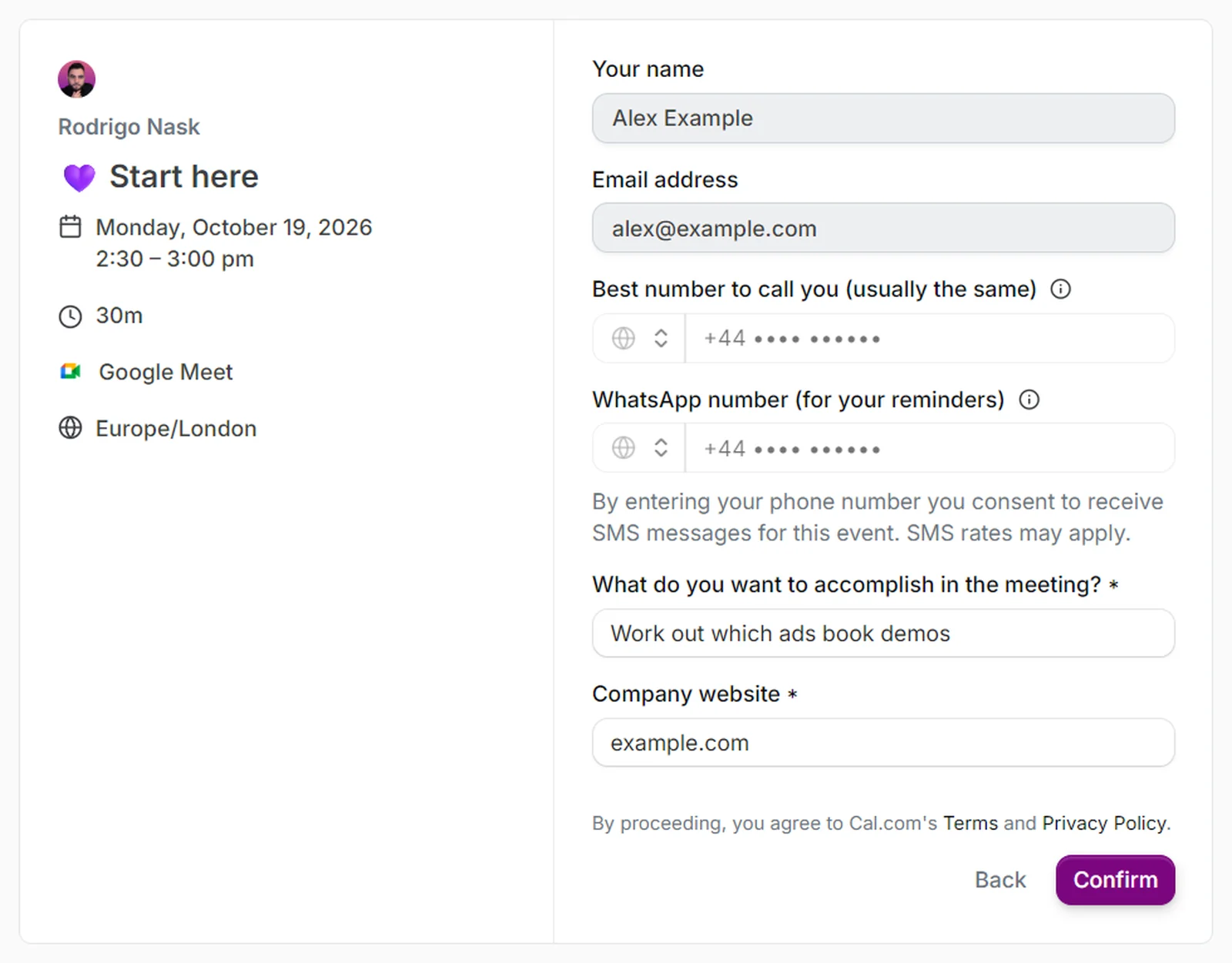
Step 3: four touches, timed to the call
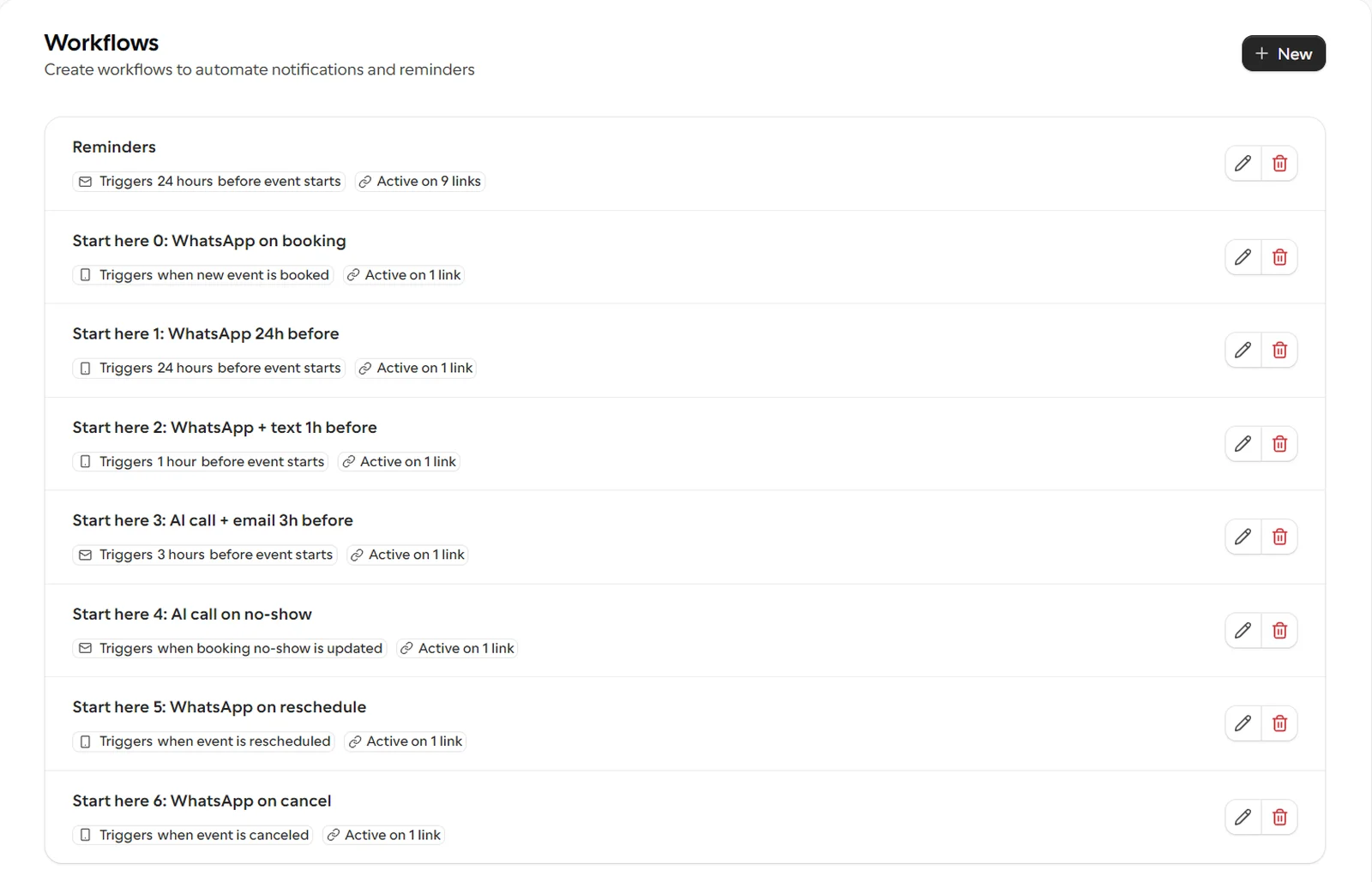
Now the cadence. In cal.com, each touch is a workflow: a trigger, a time offset, and one or more actions. Click them together yourself, or have Claude Code click them in your browser, which is how mine were built (last step). Every one is active on the hidden event only.
- On booking: WhatsApp. cal.com sends its own confirmation email anyway.
- 24 hours before: WhatsApp.
- 3 hours before: AI confirmation call, plus the reminder email.
- 1 hour before: WhatsApp, plus an SMS in your own words.
- On reschedule: WhatsApp.
- On cancel: WhatsApp.
- On no-show: AI call. This one is Step 5.
Two things you will want to do here that cal.com will not let you do the way you expect. WhatsApp only sends cal.com’s fixed templates, so the WhatsApp touches say what the “Reminder” template says, with the time and the link filled in. Your own text goes in the SMS. And custom text in the reminder email needs a paid cal.com plan, so on my plan the 3 hour email is the stock reminder. My own words live in the SMS, in the AI call script and in the no-show emails, which is where they matter anyway.
Take the general reminder workflow off this event, too. My old 24 hour “Reminders” email ran on every event. On this one it would double up with the WhatsApp, so I removed it here and left it on the other nine.
Step 4: an AI call that confirms or moves
The 3 hour touch is a phone call from Cal.ai, cal.com’s voice agent. You give it a phone number to call from, a voice, and a prompt. It reads the booking, calls the number from the AI field, and can move the booking itself with a reschedule tool.
The prompt is the whole product here, so here is mine with my details swapped for placeholders. The double braces are cal.com’s own variables.
You are <your name>'s assistant. <your name> runs <what you do, one line>.
You are calling {{ATTENDEE_FIRST_NAME}}, who booked a call with <your name> for
today at {{EVENT_START_TIME_IN_ATTENDEE_TIMEZONE}} ({{ATTENDEE_TIMEZONE}}).

Your only job: make sure they show up, or move the call to a time they will
show up for. Keep the whole call under 60 seconds.

Tone: friendly, quick, a bit cheeky. Never salesy, never pushy, never robotic.

Steps:
1. Confirm they are still coming today at {{EVENT_START_TIME_IN_ATTENDEE_TIMEZONE}}.
2. If yes: the meeting link is in their email and WhatsApp. Say what the call
   is about in one sentence. Ask if they watched the short videos from the
   booking email. If not, say they take 4 minutes. Thank them, end the call.
3. If they cannot make it: offer to move it now. Ask what day and time works
   and use reschedule_current_booking. Never cancel the booking yourself.
4. Wrong person or wrong number: apologize and end the call.

Rules:
- Never discuss price, packages or results. "How much" is what the call is for.
- Never claim to be <your name>. You are the assistant.
- Stop, not interested, don't call me: apologize, confirm no more calls, end.
- Voicemail: "Hi {{ATTENDEE_FIRST_NAME}}, it's <your name>'s assistant. You're on
  with them today at {{EVENT_START_TIME_IN_ATTENDEE_TIMEZONE}}, the link is in
your email. See you there."- Under 60 seconds
- Never cancels
- Never quotes a price
- "Stop" ends it, for good
The rule that does the most work is “never cancel the booking yourself”. “I can’t today” is not a no. It is a request for a different day, and the AI has the tool to give them one on the spot.
The second rule that matters is the price rule. An AI that answers “how much” has run your sales call for you, badly, three hours early.
Step 5: catch the no-show, then bridge it to Klaviyo
The no-show branch starts from one flag: the attendee marked as a no-show on the booking. That flag triggers the AI call workflow (“when booking no-show is updated” in cal.com), and the same flag goes out on a webhook, which is how Klaviyo hears about it.
Here is the trap. On Google Meet the flag is not set for you. cal.com detects no-shows on its own video, Cal Video. On Meet, you open Bookings and mark the attendee as a no-show by hand, and only then does anything in this step fire. Make it part of leaving the room, every time.
The webhook goes to a Cloudflare Worker. It does three things. It checks the signature, because anyone can POST to a URL. It maps each cal.com trigger to one Klaviyo metric. And it shapes the event so the email flows have what they need.
// cal.com webhook -> Klaviyo events. Secrets live in the Worker, never in the code.
const METRICS = {
  BOOKING_CREATED: "Call Booked",
  BOOKING_RESCHEDULED: "Call Rescheduled",
  BOOKING_CANCELLED: "Call Canceled",
  BOOKING_NO_SHOW_UPDATED: "Call No-Show",
};

async function validSignature(secret, body, signature) {
  if (!secret || !signature) return false;
  const key = await crypto.subtle.importKey("raw", new TextEncoder().encode(secret),
    { name: "HMAC", hash: "SHA-256" }, false, ["sign"]);
  const mac = await crypto.subtle.sign("HMAC", key, new TextEncoder().encode(body));
  const hex = [...new Uint8Array(mac)].map((b) => b.toString(16).padStart(2, "0")).join("");
  return hex === signature;
}

export default {
  async fetch(request, env) {
    if (request.method !== "POST") return new Response("ok");
    const raw = await request.text();   // sign the raw body, before any JSON.parse
    if (!(await validSignature(env.CAL_WEBHOOK_SECRET, raw, request.headers.get("x-cal-signature-256"))))
      return new Response("bad signature", { status: 401 });
    const { triggerEvent, payload } = JSON.parse(raw);
    const metric = METRICS[triggerEvent];
    if (!metric) return Response.json({ skipped: triggerEvent });
    // build one event per attendee (no-shows: only attendees flagged noShow: true),
    // with unique_id = booking id + trigger, then POST each to Klaviyo /api/events/
    // ...
  },
};
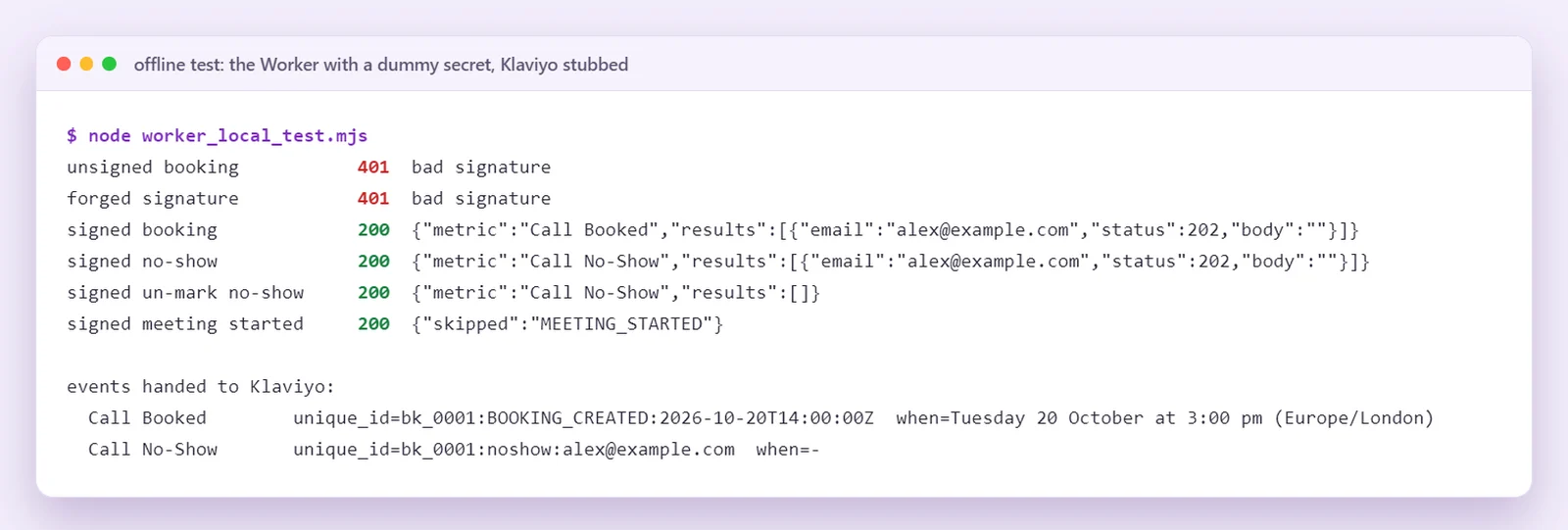
The details that took the time: the signature is computed over the raw body, so read it as text before parsing it. Booking answers arrive either as strings or as { value } objects depending on the field type, so unwrap both. The no-show payload carries only the booking id and each attendee’s noShow flag, not the full booking, so the no-show event is thinner than the booked one. Un-marking a no-show fires the same trigger with the flag off, and must send nothing. And every event gets a unique_id, which Klaviyo’s create event API uses to drop duplicates, so a cal.com retry never counts twice.
The Klaviyo API key and the webhook secret are Worker secrets, set with wrangler secret put. They are not in the code and not in the repo.
BOOKING_CREATEDCall BookedBOOKING_RESCHEDULEDCall RescheduledBOOKING_CANCELLEDCall CanceledBOOKING_NO_SHOW_UPDATEDCall No-Showanything else skippedTest it before you point cal.com at it. I ran the Worker locally with a dummy secret and Klaviyo stubbed out, so nothing left the machine:
Step 6: three emails that stop when they rebook
In Klaviyo, the no-show flow is triggered by the “Call No-Show” metric the Worker sends. Three emails, plain text, from me:
- Straight away. Subject “missed you today”. I was on the call, they were not, no lecture. One useful thing to look at in their own business, and the booking link.
- One day later. Subject “still want it?”. The slot went to someone else, there is one open this week, and replying “later” stops the chasing.
- Three days after the no-show. Subject “closing your file”. Last one, the calendar link, no hard feelings.
Emails two and three each carry a filter: send only if this person has zero “Call Booked” events in the last one day or three days. Someone who rebooked after the first email drops out, and the new booking starts the normal cadence from the top.
I built both flows through the Klaviyo flows API rather than clicking them together, from one script that is safe to re-run: it creates the templates, looks up the metric ids, and skips any flow that already exists by name. Every email action is created as a draft. Nothing sends until the copy is approved and a second script sets the flow live. The no-show copy was approved on 17 October, and the system went live on the 18th.
There is also a “Call Booked” flow with a confirmation email in it. It stays off. cal.com already sends a confirmation, and two confirmations for one booking is how you teach people to ignore you.
The traps, so you skip them
These are the ones I hit building it, in the order they bite.
- WhatsApp is template only. cal.com sends four fixed WhatsApp templates. Custom text is SMS only. Write your voice into the SMS and the AI prompt, not into WhatsApp.
- The AI call field cannot be hidden. It sits on the form whether you like it or not, and when it is empty, no call is placed. I tested it. Label it “usually the same” and prefill it from the page.
- Custom email text needs a paid plan. On my plan the reminder emails are cal.com’s stock text.
- No-show is not automatic on Google Meet. Mark the attendee by hand, or move the event to Cal Video, which detects it.
- New events do not inherit workflows. “Apply to all, including future” is off on my reminder workflow, so a new event gets its workflows added by hand. Check every new event before it goes in a funnel.
- Internal names leak. Whatever you call the call in your head ends up in a template variable eventually. Name the event the way you want the booker to read it.
What it costs, and what you get
Measured on my own account on 17 October, from my expense log. One cal.com credit is one cent.
- Two phone numbers for the AI calls, one for confirmations and one for no-shows: $5 a month each.
- AI call: $0.30 a minute, billed by the second. A 46 second test call cost 23 credits.
- WhatsApp to a UK number: 4 credits, so $0.04 a message.
So a booking that runs the full path, three WhatsApps and a 46 second confirmation call, costs 35 cents in credits, plus the SMS, which I have not measured yet. A no-show adds one more call. Next to what one shown-up sales call is worth, that rounds to zero.
What you get is a booking touched four times before the call, by a louder channel each time, where the easy option is always “move it”, not “skip it”. Skip it anyway, and they hear from you the moment they are marked as a no-show, until they rebook or say stop.
It also feeds the rest of the funnel. Every booked, rescheduled, canceled and no-show event now sits in Klaviyo against the person. If you send conversions back to Meta from your own records, a call that showed up is a stage worth more than a booking, and the ads should learn the difference. If you forecast from bookings alone, read how I read funnel benchmarks first: every stage you skip makes the forecast more optimistic.
Hand it to Claude Code
You do not have to build any of this by hand, including the cal.com part. I did not. Claude Code built mine: it clicked every cal.com screen in my own Chrome through Playwriter, a browser tool that drives your logged-in browser, and it used the APIs for Klaviyo and Cloudflare.
| access | what Claude Code sets up with it |
|---|---|
| Your own Chrome, logged in to cal.com, through Playwriter | the hidden event, the booking form and the prefill lock, all seven workflows, the two Cal.ai agents, the signed webhook |
| Klaviyo private API key | the metrics, the three emails, the no-show flow, as drafts |
Cloudflare, through wrangler login |
the Worker, with the webhook secret and the Klaviyo key as secrets |
One trap with the browser route: check which cal.com account Chrome is logged in to before anything gets clicked. If you manage other people’s calendars, it may be theirs.
Paste this into Claude Code:
Read https://rodrigonask.com/calcom-show-rate-reminders-no-show-system and set
up the same show-rate system on my accounts, end to end.

Access:
- cal.com: Playwriter on my own Chrome, already logged in. First confirm the
  account name on screen is mine. Do in the browser what that page describes.
- KLAVIYO_API_KEY (env var, never in a file): metrics, templates and flows.
- Cloudflare: run `wrangler login` and wait for me to approve it.

Me: cal.com handle <handle>, event to copy <event name>, video <Google Meet |
Cal Video>, funnel page in <repo or tool>, it collects <fields>.

Build, in this order:
1. Duplicate the event, hide it, cut the booking form to the fields on that
   page, lock name, email and both phone fields when prefilled.
2. Add the prefill redirect to my funnel page.
3. Write both AI call prompts (confirm, no-show) in my voice. Show me.
4. Create the two Cal.ai agents with those prompts. STOP before buying the
   phone numbers and tell me the monthly cost. I approve.
5. Create the seven workflows listed in Step 3 of that page, active on the
   new event only. Re-read the workflow list after each one.
6. Write the Worker, run the offline signature test, deploy it, set the
   secrets, add the cal.com webhook with the same secret.
7. Create the Klaviyo no-show flow as drafts, with the rebooked filter.
8. Make one test booking with my own email and phone. Show me every touch,
   then cancel the test booking.

Do not set the Klaviyo flow live and do not delete any existing workflow.
Stop and show me the copy before anything sends to a real person.
It stops twice on purpose: before it spends money on the numbers, and before anything goes live.
If you want it to run unattended and prove it finished, wrap that in a goal with the Build a Goal skill. If you need the page in front of the calendar too, the Clone Website skill builds one.
When not to do this
If you take a handful of calls a month from people who already know you, a reminder email is enough.
If your calls come from people who have never heard of you, think twice about the AI call. An assistant ringing about a call nobody remembers booking feels like spam. The cadence works because the page sold first.
If nobody is going to mark no-shows on Google Meet, half of this never fires. Either make it part of leaving the call, or move the event to Cal Video.
I build this for clients as part of running the whole acquisition stack. It is agentic marketing in practice: the system follows up, I take the calls. The case studies show what that stack produced, HyperTask included.
Every system I build like this goes into my community, Claude For Marketing, first: the prompts, the Worker, the flow scripts and what the show rate actually does once the numbers are in. If you would rather have the whole booking funnel built for you, book a call.
Get it in the LibraryBook a callWork with me 1-on-1Do I need a paid cal.com plan for this?
Not for what I built. The WhatsApp templates, the SMS, the AI calls and the webhook all run on my current plan plus usage credits. The one thing that needed a paid plan was custom text in the reminder email, so the 3 hour email is the stock cal.com reminder, and my own words go out in the SMS, the AI call script and the no-show emails.
Why WhatsApp and SMS instead of more emails?
Because the email is the touch people already ignore. A booking made on Monday for Thursday competes with a whole inbox by Thursday. A WhatsApp lands where they read every message, an SMS lands even when data is off, and a phone call three hours out is the one touch that gets an answer either way: yes, or a new time.
Will an AI call annoy people who booked a call with me?
It is under a minute, it says who it is calling for, and it has one job: confirm the call or move it. It never pitches, never discusses price and never pretends to be you. If someone says stop, it apologizes and ends the call. The system went live on 18 October, so I will publish what people actually said once there is enough of it to count.
What happens if someone rebooks after a no-show?
The chase stops. The first no-show email goes out straight away, then the second and third each check whether that person has a new booking in the last one or three days before they send. A rebooked person drops out of the sequence, and their new booking starts the normal reminder cadence from the top.
Why a Cloudflare Worker and not a no-code connector?
Because it is one small file I can read, it checks the cal.com signature before anything touches Klaviyo, and it shapes every event the way the flows need it: a readable local time, the reschedule link, one unique id per event so a retry never counts twice. A connector can forward a webhook, but someone still has to check who sent it.