
Key takeaways
- Every Claude Code turn re-reads your CLAUDE.md chain, your memory index, every skill description and every MCP tool name.
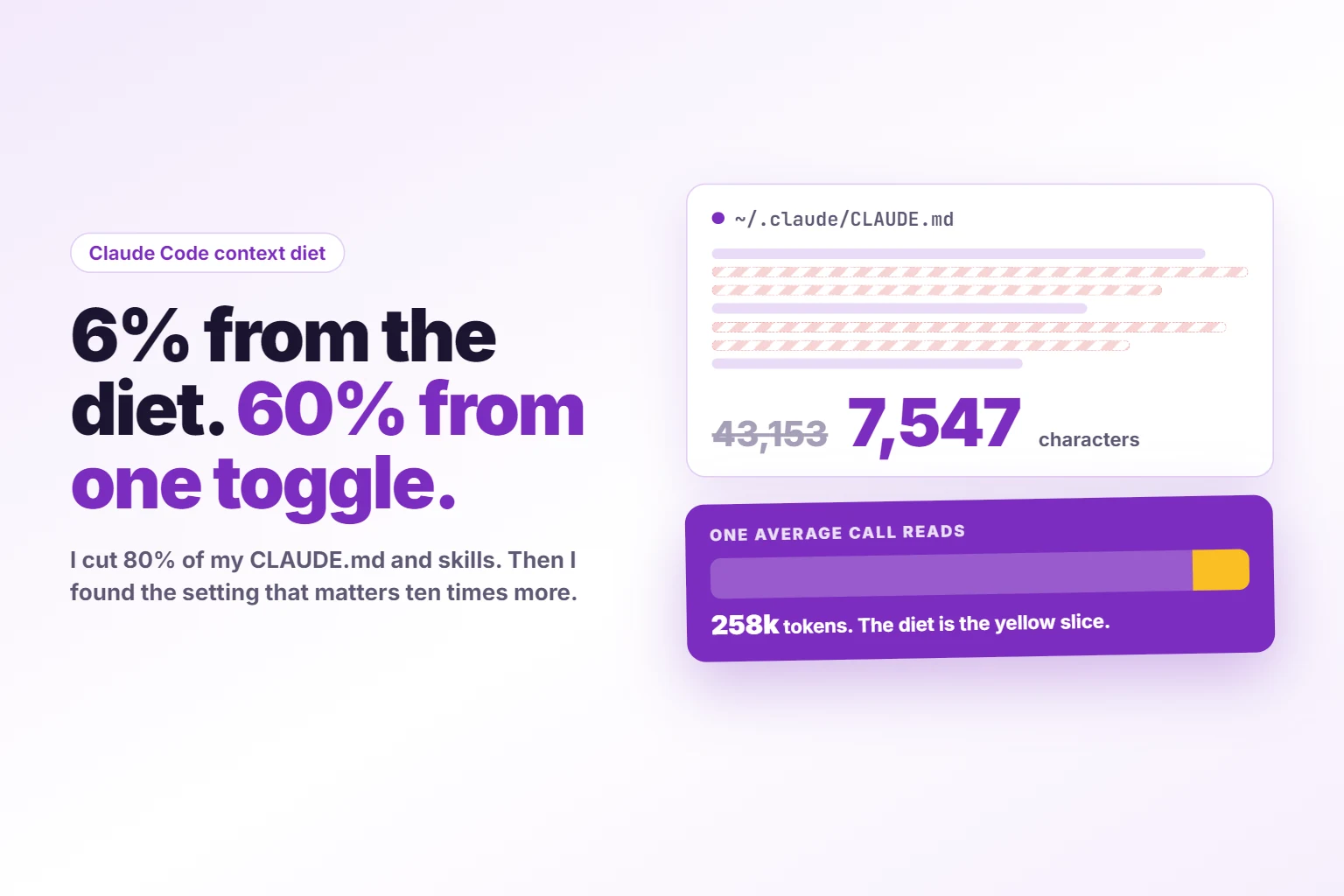
- I cut more than 80% of my global CLAUDE.md and skill descriptions, 97,935 characters down to 16,830, without weakening a single rule.
- Move, never delete: the detail goes into reference files behind one-line pointers, so nothing is lost.
- Six minutes with the prompt below gets you about 6% more quota on paper. It took me an hour.
- The bonus is one toggle, the auto-compact window. Replayed on my last 98,245 calls, it estimated about 60% more quota. I now run it at 500k, not 200k, so working chats keep their history.
- Measured two weeks later, the diet and the toggle together: cost per finished task from $2.57 to $1.06 to $1.33, and 35% to 48% less per 1,000 output tokens.
- The catch: I spent the savings. Output per day more than doubled, so my daily usage went up 46%.
A context diet is cutting the fixed text Claude Code re-reads on every turn (CLAUDE.md files, memory indexes, skill descriptions and MCP tool names) without weakening any rule, then capping how long a chat grows before it compacts.
I was hitting my Max limit constantly. Not on Friday. Mid week, with clients still waiting.
So I pulled 14 days of my own Claude Code transcripts and counted where the usage went. About two thirds of it was cache reads: the same context, re-read on every single turn. At Opus API rates that fortnight of re-reading would have cost about 10,400 USD. I am on Max, so it was not money. It was the wall I kept hitting.
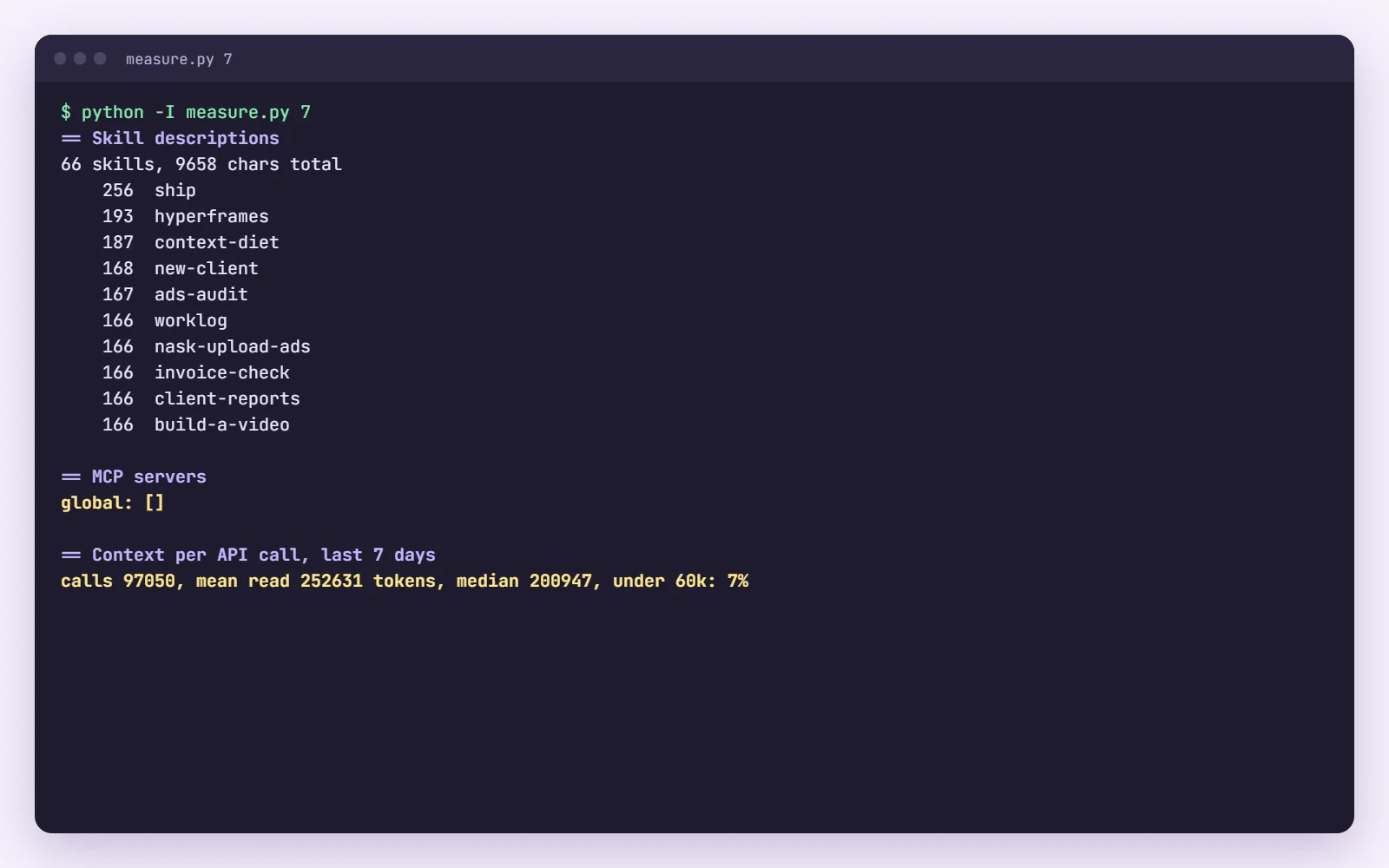
Then I measured one week of calls. 93,384 API calls. The mean call read 258,000 tokens of context. The median read 208,000. Only 6% of calls read less than 60,000.
Part of that load is fixed. It is there before you type a word, in every chat, in every project. I had let it grow for months, one “never do this again” at a time. My global CLAUDE.md alone was 659 lines.
This is how I cut it, step by step, so you can do the same to yours. And at the end, the bottom line: on paper the diet was worth about 6% more quota, and the toggle I found while doing it about ten times that. Then I measured what really happened, and the update at the end has the numbers.
What you are building
A smaller fixed load and a shorter chat. Five layers ride along with every message you send:
- Your global CLAUDE.md, in
~/.claude/, loaded in every project. - The CLAUDE.md chain: Claude Code also loads the CLAUDE.md of the folder you work in and of every parent folder above it. See how Claude Code memory loads.
- The memory index: if you use auto memory, a
MEMORY.mdper project, loaded at the start of every chat in that project. - Skill descriptions: the name and description of every skill you have, so Claude knows when to use one. The body only loads when the skill runs.
- MCP tool names: every tool of every server that is switched on for the project.
None of that is a problem once. It is a problem because it is paid again on every turn, and a long working session has hundreds of turns. The target is not zero. It is the smallest fixed load that keeps every rule at full strength, plus a chat that does not grow forever.
Why deleting rules is the wrong diet
The obvious move is to open CLAUDE.md and delete what looks old. Do not.
Every line in that file is there because something went wrong once. My hidden-windows rule exists because console windows kept popping up over my work. My browser rule exists because one automated session on the wrong website is one too many. Delete the line and you are one bad afternoon away from writing it again.
The other obvious move is to ask Claude to “make it shorter”. It will, and it will quietly soften the rules while it does. “Never” turns into “avoid”. The reason disappears. The result reads well and stops working.
What works is boring. One section at a time, biggest first, with you deciding every cut. The words get compressed. The force does not. And the detail moves to a file Claude reads only when that topic comes up, instead of on every turn of every chat about something else.
Anthropic’s own guidance on reducing token usage says the same thing in one line: keep CLAUDE.md under 200 lines and move specialised instructions out. Mine was more than three times that.
Step 1: Measure what loads before you cut anything
Start with /context inside a chat. It shows what is filling the window right now, split by system prompt, memory files, skills, MCP tools and messages.
Then measure the thing that matters for your quota: how much context a call actually reads. Claude Code writes every session to a JSONL transcript under ~/.claude/projects/, and every API response logs its token usage. This counts the last seven days:
import glob, json, os, statistics, time
cut = time.time() - 7 * 86400
reads = []
for p in glob.glob(os.path.expanduser("~/.claude/projects/*/*.jsonl")):
    if os.path.getmtime(p) < cut:
        continue
    for line in open(p, encoding="utf-8", errors="ignore"):
        if '"cache_read_input_tokens"' not in line:
            continue
        try:
            u = json.loads(line).get("message", {}).get("usage") or {}
        except ValueError:
            continue
        if "cache_read_input_tokens" in u:
            reads.append(u["cache_read_input_tokens"])
print(len(reads), "calls, mean", int(statistics.mean(reads)),
      "median", int(statistics.median(reads)))
Then size the fixed layers: the character count of every CLAUDE.md in your project tree, every MEMORY.md, the total length of all skill descriptions, and the MCP servers in ~/.claude.json, global and per project. Write the numbers down. You need a before to know whether the after was worth an afternoon.
Step 2: Trim CLAUDE.md section by section, and move the detail out
Sort the sections of your global CLAUDE.md by size and start at the top. For each one, decide between four things:
- Keep it as it is. Rare.
- Compress it: same rule, same force, fewer words.
- Move the detail to a reference file and leave a one-line pointer.
- Delete it, because you no longer want the rule.
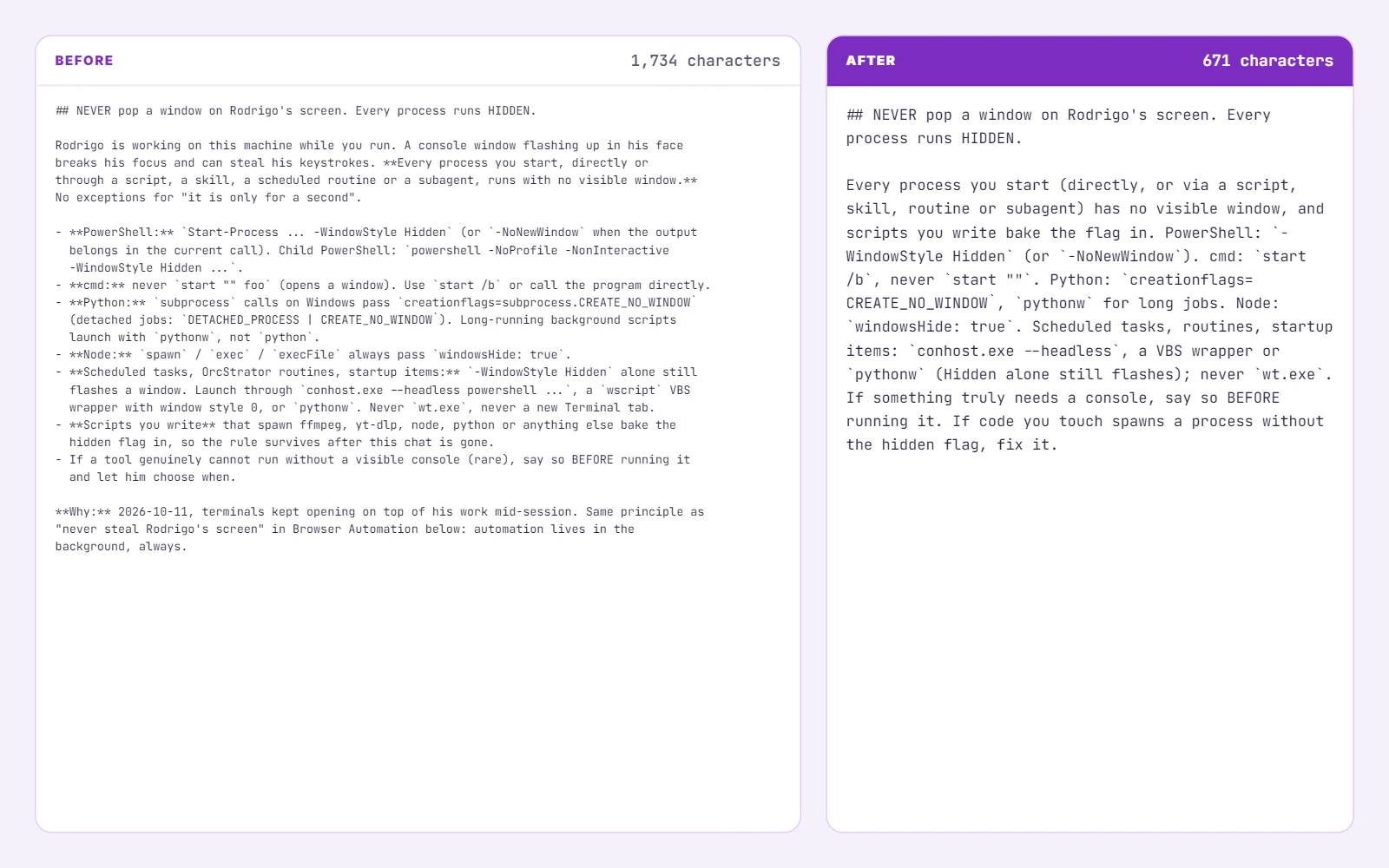
My biggest section was an advisory panel, 8,208 characters describing seven advisors and when each one speaks. The trigger stayed in CLAUDE.md, because it has to fire without being asked. The detail moved to ~/.claude/reference/advisory-panel.md. 1,513 characters stayed. My browser safety rule went from 5,424 characters to about 1,000, and it still says never. The hidden-windows rule went from 1,734 to 671.
The pointer is the whole trick. It names the trigger and the file, and nothing else:
## Advisory Panel
Seven standing advisors volunteer advice unprompted. Silent by default.
Before speaking, read ~/.claude/reference/advisory-panel.md for that
advisor's threads and the real numbers.
The reference file opens by saying where it came from, and holds the moved text verbatim:
# Advisory panel (moved from global CLAUDE.md 2026-10-11)Two rules on placement. Never put reference files in ~/.claude/rules/, because Claude Code loads that folder automatically and you have moved nothing. And triggers that must fire without being asked stay inline. Only their detail moves.
Seven advisors volunteer advice unprompted. Silent by default.
Before speaking, read reference/advisory-panel.md
Do this with Claude, but decide every cut yourself. I often cut harder than it proposed: I deleted a guarantees section and a note about my funding outright, archived a UTM checklist I no longer needed every turn, and asked for one-paragraph versions of others. Back up first, CLAUDE.md.bak-<date> next to the file, because CLAUDE.md usually has no version history.
Then repeat for every project CLAUDE.md in the chain. My six biggest project files went from 73,898 characters to 26,743. Some of them contradicted themselves. Nobody had read them top to bottom in months, including Claude, which read all of them on every turn. Flag contradictions like that and fix the facts yourself. Never let Claude pick which number is true.
Step 3: Compress every skill description to one line
Skills are where most of my work lives now, from a video editor Claude learned from two YouTubers to the one that stages these articles. Every skill’s description loads on every turn. The body does not. So the description has one job: tell Claude when to use the skill. That is a sentence on what it does plus two or three phrases you actually say.
I capped mine at about 160 characters, and about 90 for sub-skills that an umbrella skill routes to. My 68 skill descriptions went from 54,782 characters to 9,283 for 65 skills; the three dead ones went to an archive folder outside the skills directory.
Before:
description: Turn any piece of work into a runnable /goal: a durable plan .md
  that absorbs all the boilerplate as numbered sections, plus a trigger prompt
  that INDEXES the plan rather than restating it and so fits inside the
  4000-character /goal limit. Settings (agents, iterations, images, web...
After:
description: "Turn any work into a runnable /goal: plan plus trigger under 4000
  chars, money default zero. Use for \"build a goal\", \"turn this into a /goal\"."
Notice “money default zero” survived. Safety wording that changes behaviour stays, in a few words. Everything else moves into the skill body, verbatim, under a heading like ## Scope notes (moved from description 2026-10-11).
Then validate every frontmatter with a YAML parser. This was the surprise of the whole run: 14 of my skills had broken frontmatter, mostly an unquoted colon inside the description, so their descriptions never loaded at all. Claude could not see those skills to trigger them. Compressing the descriptions fixed triggering as a side effect. Read how skills load if you have never looked.
Step 4: Shrink the memory indexes
If you use auto memory, each project has a MEMORY.md index that loads at the start of every chat in that project. It is meant to be an index: one line per memory file, pointing at the file. Over time it turns into a second CLAUDE.md.
My 12 biggest indexes held 100,187 characters. One project’s index was 19.6k on its own, bigger than my entire trimmed global CLAUDE.md. After the trim they hold 55,660.
The format I moved every line to:
- [Short explanations only](feedback_short_explanations.md) - state it, then stopUnder about 120 characters, a title, a file, a hook. The procedure that keeps it lossless: any fact that lives only in the index line gets appended to its memory file first, then the line gets cut.
Expect to find lines that contradict their own memory files. I found several: the index said one thing, the file had been updated and said another, and Claude was reading the stale one first. Same rule as before. Flag it, decide it yourself.
Step 5: Scope MCP servers to the projects that call them
MCP tool definitions are deferred now, but their names still load, and a server set at user scope loads in every project. I had one server with 52 tools loading everywhere. I use it in a handful of folders.
Count real calls, not mentions. This is the trap I fell into first: every transcript lists every available tool name, so a grep for the server name matches every session you ever ran. Count the tool calls instead:
grep -o '"name":"mcp__yourserver__' ~/.claude/projects/*/*.jsonl \
  | cut -d: -f1 | xargs -n1 dirname | sort | uniq -c | sort -rn
Swap yourserver for the server’s name. That prints one row per project folder with its real call count. Mine came back with five folders, one of them holding almost all the calls. Move it from the global mcpServers in ~/.claude.json to those projects’ entries, or add it fresh with claude mcp add --scope local from inside each project. On Windows, check for the same project stored twice under different capitalisation. The MCP scopes documentation explains which file each scope writes.
While you are there, disable any plugin or connector that fails to connect.
$ grep -o '"name":"mcp__yourserver__' ... | uniq -cStep 6: Flip the toggle that beats the diet
This is the step that is not a trim, and it is the bottom line of the whole post.
Claude Code compacts a conversation, summarising older history, when it reaches its auto-compact window. On a 1M model the default lets a chat grow to roughly 967k tokens first. The tool I use to run several sessions at once compacted at 80% of the window, around 800k. Every turn in that chat re-reads all of it.
So I replayed my last week through a lower window. 98,245 real calls, each session’s growth turn by turn, and every time the context crossed the window it dropped to a summary and grew again. With a 200k window, total reads fell by 55 to 58%. Cache reads are about two thirds of my usage, so on paper that is roughly 60% more quota, from one setting. That was the replay estimate. The measured number is in the update at the end: 35% to 59% cheaper per unit of work, with the diet and the toggle together.
The downside is real, and I found it the hard way. Older history becomes a summary instead of the full text. At 200k my working chats compacted so often that they came back from a summary without the details they needed. /compact with a line on what to keep helps, but not if it happens three times in one build.
So I set it by activity rather than one number for everything:
- Working chats, building, writing, debugging: 500k. I started at 200k and raised it, because chats kept losing too much at every compaction. 500k still kills the long tail. Everything it reads above 200k came to 8% of my spend over 12 days, before counting the extra compactions a 200k window would trigger. That is the price of chats that remember what they are doing, and I pay it.
- Unattended routines and scheduled jobs: the 100k minimum, on Sonnet, and they compact after every run, so the next run starts lean.
- Long research or a big refactor where the history is the work: higher, and I compact by hand with
/compactand a line saying what to keep.
The default for every model goes in ~/.claude/settings.json:
{
  "autoCompactWindow": 500000
}
Inside a chat, /autocompact 500k changes it for the current model. For a single launch, claude --autocompact 100k overrides the saved value without touching it, which is how a routine gets its own lower window. Scripts can set CLAUDE_CODE_AUTO_COMPACT_WINDOW=100000. The model configuration docs list every way to set it.
The habit matters as much as the setting. /clear between unrelated tasks costs nothing. A chat that started as a bug fix and is now writing a blog post is carrying the bug fix on every turn.
What you get: the honest maths
Here is the whole before and after, in characters loaded every turn:
| layer | before | after |
|---|---|---|
| Global CLAUDE.md | 43,153 | 7,547 |
| Parent folder CLAUDE.md | 5,252 | 1,490 |
| Skill descriptions | 54,782 | 9,283 |
| Six project CLAUDE.md files | 73,898 | 26,743 |
| Twelve memory indexes | 100,187 | 55,660 |
About 277,000 characters down to about 101,000. It looks enormous. Now the part that does not go in the screenshot.
A typical project chat carries one global CLAUDE.md, a couple of folders in the chain, one memory index, all the skill descriptions and the MCP names. For a typical chat of mine, the saving is about 95,000 to 100,000 characters, which is 25,000 to 28,000 tokens less per call.
My mean call read 258,000 tokens. So the trim removes about 10% of what a call reads. Cache reads were about two thirds of my usage, so 10% of two thirds: roughly 6% of everything. In plain words, about 6% more quota. Worth an afternoon. Not a miracle.
The miracle is chat length. A call that reads 258k on average is a call inside a long chat, and the fixed load is a small slice of it. So the bottom line, on paper: about 6 minutes with the prompt below gets you roughly 6% more quota, and the toggle in step 6 is worth roughly 60% more, by the replay. The diet took me an hour. The toggle takes ten seconds. What the two did together in real life is in the update below.
25k to 28k tokens less per call, about 6% more quota
The trim still mattered for a reason the maths does not show. The 14 skills that never triggered now trigger. The contradictions are gone. A shorter file is a file Claude follows.
And the fat grows back. Every bad afternoon adds a rule, every new skill adds a description, every new project adds an index. So the diet is not a one-off. I set a monthly routine that reruns the measurement, compares it with last month’s numbers and lists what grew back, biggest first. It proposes cuts and applies nothing until I say yes, then re-arms itself for the next month. A diet you check once a year is a diet you are already off.
Update 2026-10-28: the measured numbers
Two weeks later I measured it. Every API call in my transcripts since September 20, main chats and subagents, 262,289 calls after removing duplicates. Every call is priced at one fixed Opus 5.5 rate, so switching to a cheaper model cannot pass for a saving. Before is September 28 to October 10. After is October 16 to 24, with the diet and auto-compact on. A third period, October 25 to 27, adds a second, leaner trim of my rules. It is only three days, so read it as a hint, not a result.
| metric | before | after | last 3 days | change |
|---|---|---|---|---|
| Cost per finished task, median | $2.57 | $1.06 | $1.33 | -48% to -59% |
| Cost per 1,000 output tokens | $0.229 | $0.150 | $0.118 | -35% to -48% |
| Mean context per call | 192k | 165k | 174k | -9% to -14% |
| Calls over 400k context | 9.9% | 3.7% | 5.5% | -44% to -63% |
| Cost per busy chat hour | $17.52 | $16.84 | $15.26 | -4% to -13% |
| Output tokens per day | 1.9M | 4.3M | 5.4M | 2.2x to 2.8x |
| Spend per day, API-equivalent | $437 | $640 | $634 | +45% to +46% |
So a finished task costs about half of what it did. Per 1,000 tokens of output, which is the closest thing to a unit of work, it is 35% to 48% cheaper. The replay promised about 60% more quota, which is the same as each unit of work costing about 37% less. The real number landed there or better. Auto-compact did what it was set up for: calls over 400k context fell 63%, and the mean call went from 192k to 165k.
Now the twist. I did not bank the savings. I spent them. Output went from 1.9M tokens a day to 4.3M, then 5.4M, because when work gets cheaper you run more of it: more tasks, more agents, more chats at once. So my daily API-equivalent spend went up 46%, and an hour of a busy chat costs almost the same as before, because every hour now does far more work. If you do the diet to stop hitting the limit, you will probably do more before you hit it again. For me that is the right trade. It is still not a smaller bill.
The caveats, so you can judge it. Output tokens include thinking, so effort settings move that number. My work mix changed between the periods. And Claude Code keeps no history of the quota meter, so the quota gain is inferred from cost, not read off the meter.
One footnote for anyone running many chats at once. The tool I use also compacts an idle chat right before its one hour cache expires, so coming back later does not mean re-reading the whole thing at full price. I scored its 24 firings against what happened next. Only 3 of 20 chats were ever reopened, so it saved $3.58, spent $7.61 compacting, and came out about $4 down. It only pays on chats of 250k or more, and either way it moves single dollars, not quotas.
Hand it to Claude Code
Paste this into a fresh Claude Code chat. It runs the diet with you, section by section, and changes nothing without your yes.
Read https://rodrigonask.com/claude-code-context-diet-cut-tokens and run a
context diet on my setup with me.

1. Measure: size my global CLAUDE.md, every CLAUDE.md in my project tree,
   every MEMORY.md under ~/.claude/projects, the total length of all skill
   descriptions, and the MCP servers in ~/.claude.json (global and per
   project). Then read the last 7 days of transcripts and report the mean
   and median cache_read_input_tokens per call.
2. Back up every file before the first edit: <file>.bak-<date>.
3. Global CLAUDE.md: sort sections by size. For each, propose keep,
   compress, move to ~/.claude/reference/<topic>.md with a one-line
   pointer, or delete. Show me the draft and apply only what I approve.
   Never weaken a safety rule. Triggers that must fire unprompted stay
   inline. Moved text goes verbatim. Never use ~/.claude/rules/.
4. Do the same for project CLAUDE.md files. Flag contradictions to me,
   never resolve a fact yourself.
5. Skill descriptions: max 160 characters, what it does plus 2 or 3
   trigger phrases I say. Move the old text into the body under
   "## Scope notes (moved from description <date>)". Validate every
   frontmatter with yaml.safe_load.
6. MEMORY.md: one line per memory, "- [Title](file.md) - hook", under
   120 characters. Append index-only facts to the memory file first.
7. MCP: count real tool calls ("name":"mcp__<server>__) per project and
   move each global server to the projects that called it.
8. Replay my last 7 days of calls through 100k, 200k and 500k
   auto-compact windows, report the estimated quota gain for each, and
   set the window I pick only after I say yes.
9. Report before and after per layer, and the honest share of quota
   the trim saves.
10. Schedule this review monthly: measure, compare with last month,
    propose cuts, apply nothing without my yes.
It is the same skill I run on my own setup, built the way I build every skill: as a goal with criteria and a check before the chat closes. The setup it trims is the one behind my agency work, from the HyperTask account to the operating system I run the business on.
When not to do this
When your setup is new. If your CLAUDE.md is 40 lines and you have five skills, there is nothing to diet. Set the auto-compact window and go back to work.
When the problem is behaviour, not words. The rule I cared about most in the whole file was “never pop a window on my screen”. Scripts kept flashing console windows while I worked. Trimming showed me that no rule could fix it: the windows came from scripts that already existed, and a rule only changes what Claude writes next. So I built a hidden monitor that catches the flashes and names the script instead. If a rule keeps getting broken, look at what is breaking it before you rewrite it a fourth time.
And when you want it to happen without you. The diet is a sitting with you in the chair, deciding. Claude proposes, you cut. Run it unattended and you get the softened “make it shorter” version, which is the one that stops working. If you are newer to all of this, start with a first project in Claude Code and come back when your CLAUDE.md has a few hundred lines of scar tissue.
Every skill I build like this, the context diet included, goes into my community, Claude For Marketing, first: the files, the runs behind them, and the numbers. If you would rather have the whole Claude Code setup reviewed with you, that is a 1-on-1.
Get it in the LibraryWork with me 1-on-1Does a shorter CLAUDE.md make Claude Code follow the rules less?
No, if you compress the words and keep the force. My browser safety rule went from 5,400 characters to about 1,000 and still says never, with the reason in one line. The long version mostly told the story of why the rule exists. That story moved to a reference file Claude reads when the rule actually comes up.
How much quota does a context diet save on a Max plan?
On paper, about 6% from the diet and about 60% from one compaction setting, by replaying my last 98,245 calls through a 200k auto-compact window. Measured over the next two weeks, the diet and the toggle together made my work 35% to 59% cheaper per unit. Claude Code keeps no history of the quota meter, so the quota gain is inferred from cost, not read off the meter.
What is the difference between moving and deleting a rule?
Moving keeps the full text in a reference file outside the folders Claude Code loads automatically, and leaves a one-line pointer saying when to read it. Deleting removes it. I moved almost everything and deleted only what I no longer wanted, like a guarantees section and a funding note. Nothing I moved was lost.
Should I remove MCP servers to save context?
Scope them before you remove them. A server added at user scope loads its tool names in every project. Count the real tool calls in your transcripts, then move each server to the projects that actually called it. I had one server with 52 tools loading everywhere and being used in a handful of folders.
What auto-compact window should I set in Claude Code?
It depends on what the chat is doing. I use 500k for working chats, set with /autocompact 500k or autoCompactWindow in settings.json, and the 100k minimum for unattended routines, which also compact after every run. I started at 200k, but working chats compacted too often and lost too much. 500k still cut my calls over 400k by 63%.