
Key takeaways
- Reviewing AI work in the chat fails because the note dies with the session. The next batch makes the same mistake.
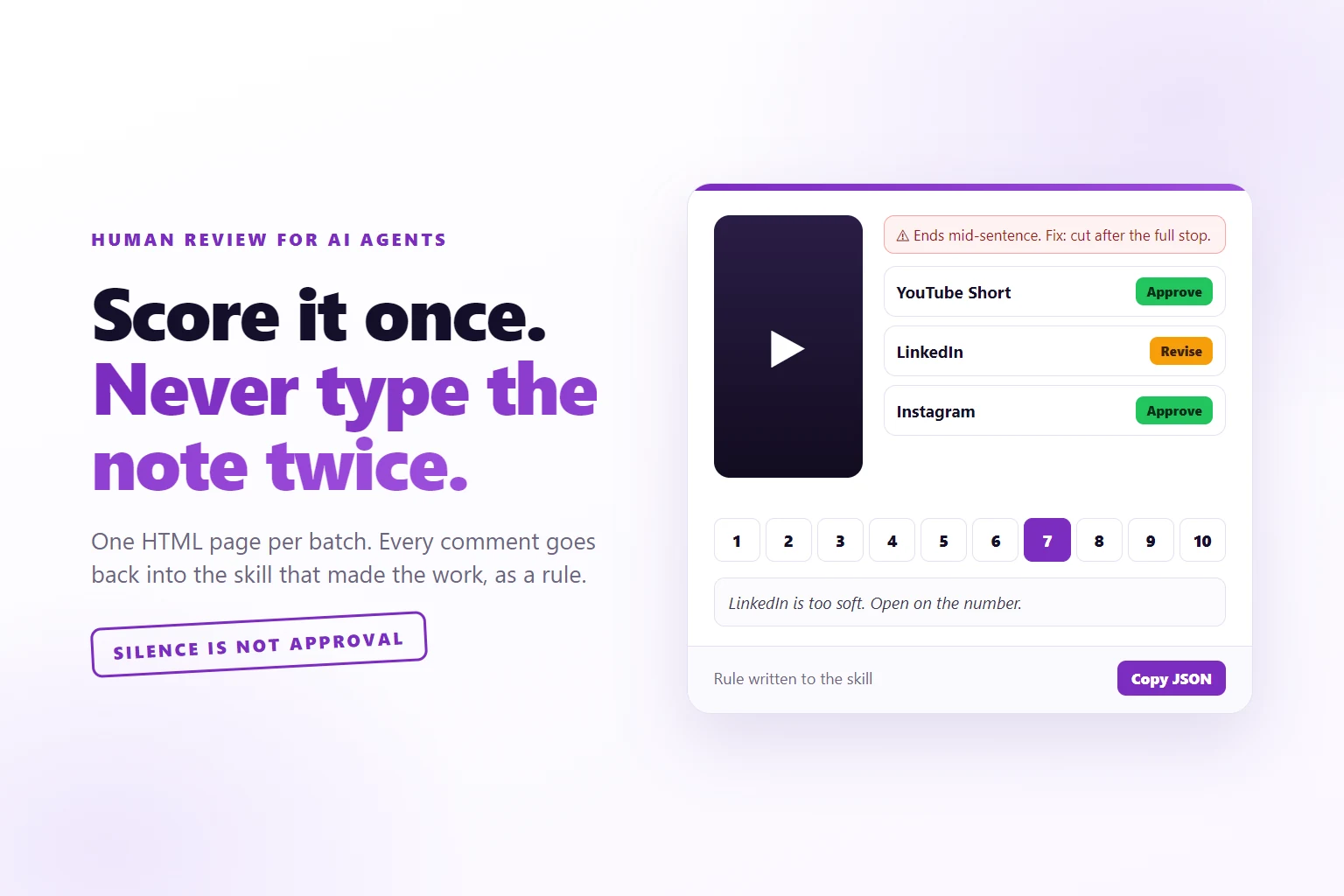
- One page per batch: the real video or image, the exact text that will ship, a 1 to 10 score, a decision per part and one comment per item.
- The agent acts only on explicit decisions. Silence is not approval.
- Every comment becomes a rule in the skill that made the work, in the same turn. The same comment twice becomes a hard check.
- My first round approved 0 of 39 posts. The second round approved 39 of 39.
A score-the-batch page is a local HTML file an agent builds for one batch of its own work, where you score each item, approve, revise or reject each part, comment once, and paste the exported JSON back. The agent acts only on explicit decisions and writes every comment into the producing skill as a permanent rule.
Your agent finished 30 posts. You scroll through them in the chat, type “too long, and stop saying genuinely”, it fixes them, you ship. Next Friday it writes 30 more. Same length. Same “genuinely”.
That is not the model being stupid. You gave the note to a session, and the session ended.
So I stopped reviewing in the chat. Every batch my agents make comes to me as one HTML page: Shorts, social posts, ad creatives, cold emails, lead lists, even the weekly list of delivery tasks. I watch the thing, read the exact text, click a score, approve or kill each piece, write one comment, press Copy JSON and paste it back. The agent does what I decided. Then it writes my comment into the skill that produced the work, as a rule, forever.
I built it on 23 September. The first batch was 16 videos and 39 social posts, and I approved zero of them. In the second round I approved all 39. This is the build, in six steps, with the code.
Why reviewing in the chat does not work
There are three normal ways to review a batch of AI work. All three fail for a solo operator, for different reasons.
In the chat. Thirty items in one scroll, no scores, your notes mixed in with everything else. The fix lands on this batch only. The skill that wrote the batch never hears about it. Claude Code’s own memory documentation says it plainly: every session starts with a fresh context window, and anything that should survive has to live in a file. A note in the chat is not in a file.
Let another model judge. This is the obvious answer and it is wrong for this job. The best-known study on model judges, Judging LLM-as-a-judge, found strong judges agree with human preferences over 80% of the time, and it named position, verbosity and self-enhancement biases. Over 80% is great for ranking chatbots. On a post with my name on it, the one in five the judge gets wrong is the one a prospect reads. And a judge model has no idea that I never say “genuinely”.
Buy an annotation tool. Label Studio, Argilla, the annotation queues inside the eval platforms. They are built for teams of labelers producing datasets. I am one person and I do not want a dataset. I want next Friday’s batch to be better. Hamel Husain makes the same argument in a piece on custom annotation tools: the review surface should show everything about the item in one place, rendered the way the product renders it. For me that means the actual reel playing next to the actual caption.
What you are building
Five pieces, and none of them needs a server.
- An items file. The skill that made the work writes
score-items.json: one item per thing you look at, the exact text per network, and a reference back to the real object. - A build script. One Node file. Items in, one self-contained HTML page out.
- The page. Media, text, a score from 1 to 10, Approve, Revise or Reject per part, one comment box per item, and a Copy JSON button.
- The act rules. What the agent may do with the JSON that comes back, and what it may not.
- The rule write-back. Every comment goes into the producing skill, and every batch goes into a log.
Anthropic’s guide to building effective agents describes agents that “pause for human feedback at checkpoints”. This is that checkpoint, shaped for batches instead of single actions. The difference that matters is the last piece: the feedback does not stay at the checkpoint. It moves upstream into the thing that makes the work.
Step 1: Make the producing skill write an items file
The skill that produces a batch also writes the file to review it. That way the page always matches what will actually ship.
{
  "batch": "Social batch 2026-09-23",
  "intro": "16 videos, 39 posts. Approved posts go live, the rest get reworked.",
  "scale": 10,
  "items": [
    {
      "id": "f0",
      "group": "Wed 23 Sep",
      "title": "Long video, four times the leads",
      "media": [{ "type": "video", "src": "upload/01.mp4", "poster": "upload/01.jpg" }],
      "flags": ["Ends mid-sentence. Fix: cut after the full stop, 2 s earlier."],
      "parts": [
        { "id": "yt", "label": "YouTube Short, Wed 18:00",
          "text": "The EXACT text that will ship.", "status": "draft", "ref": "post-0142" }
      ]
    }
  ]
}
Four rules make the file useful.
One item per thing you watch. One video, one creative, one page. The copy that goes with it on each network is a part. So I score the video once and approve each post on its own.
The text is the exact final text. Never a summary of the copy. If the page shows a summary, you are approving something that does not exist.
Every part carries a ref. A Metricool post id, a file name, an ad id. Without it the JSON that comes back cannot be acted on, because the agent cannot find the thing you approved.
Flags come with the fix. The producing skill runs its own screen first and puts every problem in red at the top of the item, with the proposed fix. My instruction to it reads: the reviewer should never have to work out what is wrong alone.
One detail I learned the hard way on 5 October: give every video a poster frame, or the tile stays black until you press play. Take a frame from the middle of the clip.
ffmpeg -ss 4 -i upload/01.mp4 -frames:v 1 upload/01.jpgStep 2: Render the page with one script
The script reads the items, checks the ids are unique, warns about any media path that does not resolve, and writes one HTML file with the data inlined.
const data = JSON.parse(fs.readFileSync(inPath, "utf8"));
for (const it of data.items) for (const m of it.media || []) {
  if (m.type === "facts") continue;
  for (const src of [m.src, m.poster]) {
    if (!src || /^(https?:|data:|\/\/)/i.test(src)) continue;
    const abs = path.resolve(path.dirname(outPath), src);
    if (!fs.existsSync(abs)) console.warn(`WARN missing media for ${it.id}: ${src}`);
  }
}
const payload = JSON.stringify(data).replace(/</g, "\\u003c");
const storeKey = `score:${data.batch || "batch"}`;   // clicks are saved per batch name
Fix every warning before you open the page. A blank tile wastes the review.
Media paths are relative to the HTML file, so the page opens by double-click and every video plays. Never point at a CDN URL that needs a login.
Two decisions here came from me rejecting things. The page is light mode, because I rejected the dark version on sight on the first day. And every round gets its own batch name, because the clicks are saved in the browser by batch name. Reuse a name and the page loads last round’s scores onto the new copy. That one is a quiet disaster: everything looks approved and nothing is.
Step 3: Score it like a buyer, not an editor
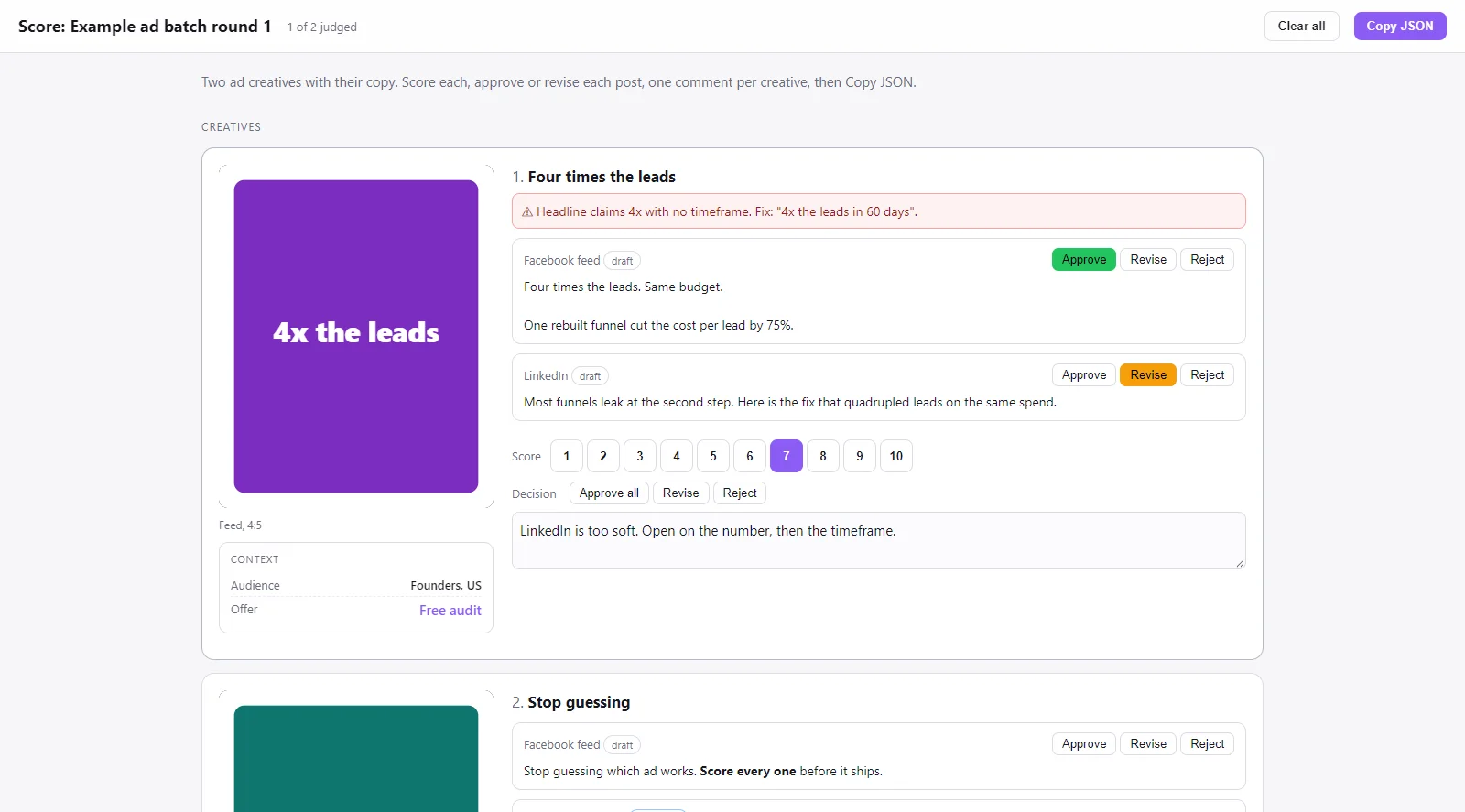
The page gives you four controls per item.
- A score from 1 to 10. How good is this, as the person it is for.
- A decision per part. Approve, Revise or Reject on each post, plus Approve all on the item.
- One comment box per item. Never one per part. On the first round the page had a box per post, and I told it, “I’m not clicking around.” One comment for the video and all its posts, and the agent reads the comment for which network it names.
- Copy JSON in the header, and a progress counter so you know how many are left.
Clicking a selected button again clears it. Everything is saved as you go, so closing the tab loses nothing.
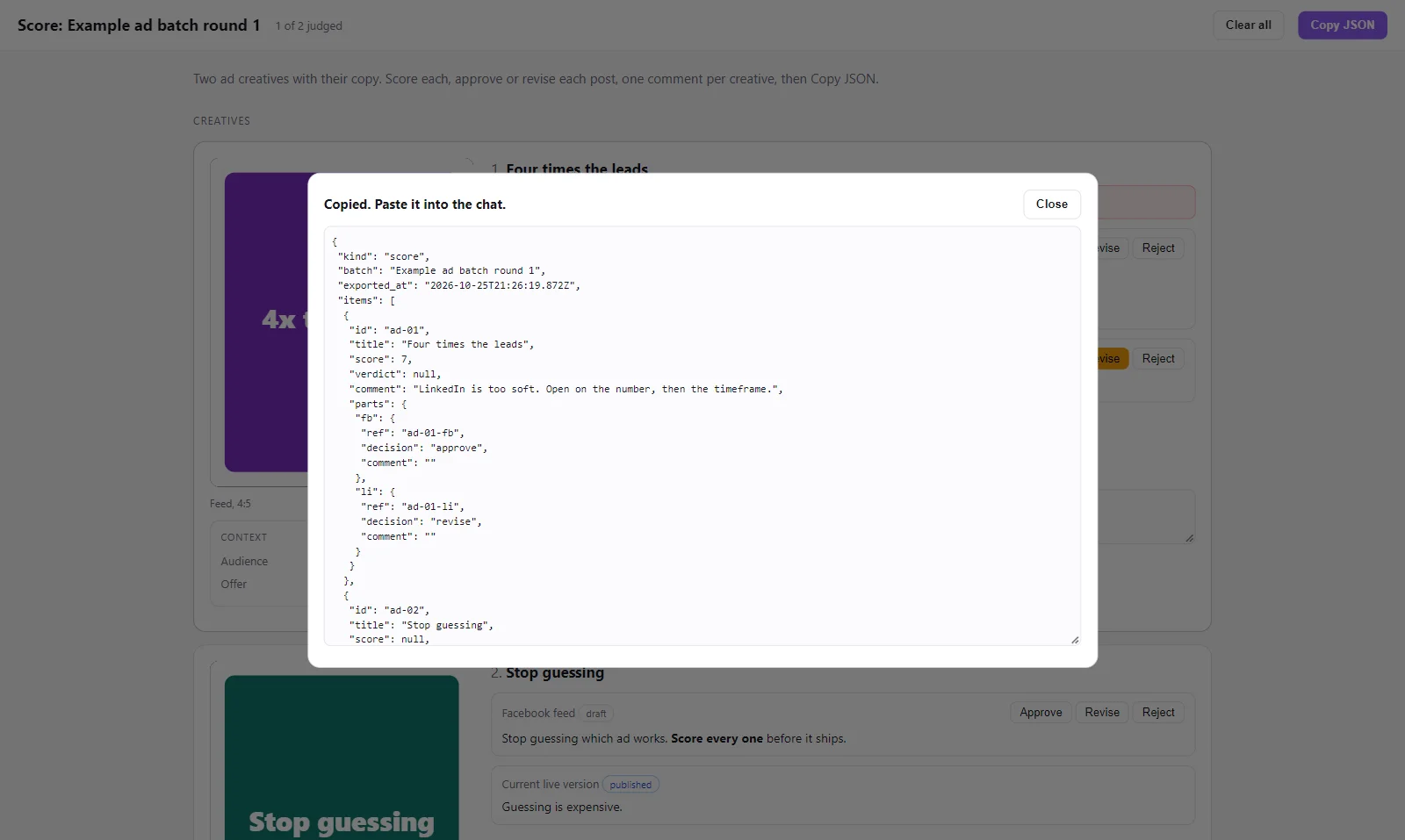
The export is a few lines, and it only carries parts with a decision or a comment:
function exportJson() {
  return JSON.stringify({ kind: "score", batch: DATA.batch, exported_at: new Date().toISOString(),
    items: DATA.items.map(it => {
      const s = S[it.id] || {}, parts = {};
      (it.parts || []).forEach(p => { const ps = (s.parts || {})[p.id];
        if (ps && (ps.decision || ps.comment)) parts[p.id] = { ref: p.ref ?? null, decision: ps.decision || null, comment: ps.comment || "" }; });
      return { id: it.id, title: it.title, score: s.score ?? null, verdict: s.verdict ?? null, comment: s.comment || "", parts };
    }) }, null, 1);
}
Here is the part nobody tells you. On my first round I gave zero scores. I left comments on 12 of 16 items. The comments are the point. The buttons are there so the easy calls take one click and your attention goes to the hard ones.
Step 4: Paste the JSON back and act only on what you decided
The JSON lands in the chat. The skill’s instructions tell the agent exactly what to do with it, in this order.
- Summarize in four lines. Approved, to revise, rejected, the average score, and the lowest items.
- Act only on explicit decisions. A part is approved only if its own decision is approve. The item buttons write their decision into every part that had none, so the export is explicit per part. An item with no parts, like a lead, carries its decision in the item verdict. Anything with no decision stays exactly as it was.
- Approved posts go live. For Metricool, flip the draft using
ref, then read the queue back and report per network. A slot that has already passed gets a new time, and the agent says which. - Revise means rework exactly what the comment says. Nothing else. The new version goes onto a fresh page for that item only. A revision never ships without a second verdict.
- Reject means park, never delete. The draft stays, with the reason logged.
const approved = (part) => part.decision === "approve";
// no decision = no action. Silence is not approval.
One trap is easy to miss. If the page shows rewritten text, the draft in the scheduler still holds the old text. So when a part is approved, the agent updates the text and flips it live in the same call, and it never flips a draft whose stored text differs from what I approved. When I approved all 39 posts on round two, the read-back said 39 scheduled, 0 drafts, and 39 texts matching the approved copy. Two of that day’s slots had already passed, and both moved to later the same day.
Step 5: Turn every comment into a rule in the skill that made the work
This is the step that makes the whole thing worth building. On the first day I told the agent, “I’m giving rules to save forever.” Fixing this batch is the small part. The job is making sure no future batch needs the same comment.
So the skill does three things before it closes the loop.
Copy comments go into one shared rules file. Anything about how I want copy written becomes a numbered rule in a COPY-RULES.md that every skill writing public copy reads first. It is phrased as a standing rule, never as “in round 1 the reviewer said”. That file holds 28 numbered rules today, from US spelling to “the hook sells a benefit to the viewer”.
Everything else goes into the producing skill. Video comments go to the video skill, ad comments to the ad skill. One line per lesson, in the form “Do X, because on this date I scored Y for Z”, with my words quoted where possible.
Low scores get a name. Every comment and every score of 5 or below gets a class: wrong number, missing context, bad framing, off voice, too long.
Two real examples. On 3 October I judged a list of 58 content ideas. I scored the first 10 and stopped: 3 approved, 1 to revise, 5 rejected. The hooks described my week instead of selling the viewer something. That one session became five rules, numbers 23 to 27, and every surviving idea was rewritten before I saw it again. On 5 October a batch of reels came back with one comment: “I loved them, but where’s the sound?” Now that skill never ships a silent reel.
The instruction block in the skill is short:
## Improve the skill that made the work
- Any comment about how copy is written goes into COPY-RULES.md as a numbered rule, this turn.
- Name the class of every comment and every score of 5 or below.
- Write the lesson into the PRODUCING skill: "Do X, because on <date> I scored Y for Z".
- Same class of comment twice across batches: make it a hard check in that skill's screen.
- Append the batch to score-log.md, newest first.
The skills documentation covers where a skill lives and how it loads. The point here is that the rule loads with the work it governs, not in every session.
Step 6: Log every batch and promote repeats into hard checks
Every batch gets an entry in score-log.md, newest first: the date, what was judged, the counts, and where each lesson went. It is the memory of the loop, and it is how I know the numbers in this post.
The log also catches repeats. A comment I have to make twice is a rule that did not hold. So the second time, the lesson stops being a note and becomes a check in the producing skill’s own screen: code or a hard gate that flags the problem before the page is built. On 23 October a lead slipped past a fit rule I had already written. Second time for that class, so it went on the list for a hard check.
Changes to the page itself go into the build script and the same log. Three more since the first round, all from use:
- Poster frames, because video tiles were black until played.
- A Blacklist button on people batches, after a reactivation list of a few hundred contacts had a few I never want contacted again. One click rejects every part, and the export carries the flag so the agent writes it to that system’s blacklist file.
- Safe HTML in part text, because imported lead descriptions arrived full of raw span tags and were unreadable. The page now renders a short whitelist of formatting tags and drops everything else.
What you get
A month in, there are 20 score pages on my disk. The ones worth counting:
- Social posts. Round one: 0 of 39 approved, comments on 12 items. Round two: 39 of 39, with my comment “schedule the hell out of everything”.
- Lead fit calls. Three days where I checked a fit filter’s yes or no on inbound leads against my own call. My calls agreed with it on 14 of 16, 13 of 14, and 10 of 13. One of the misses on day three was an existing rule failing a second time, which is exactly the signal to turn it into a hard check.
- Weekly delivery tasks. A planner proposes the week’s tasks as cards and I judge them on one page. Every rejection now goes to a closed list, so the planner never proposes it again.
The real result is not a number on one batch. It is that the comments get shorter. The first social round needed comments on 12 of 16 items. The second needed one line, and it was an approval.
Hand it to Claude Code
The skill, with the example batch from the screenshots and a /goal prompt for wiring it in unattended, is in the Library inside Claude For Marketing, my community. Download the skill from the Claude For Marketing Library, unzip it into ~/.claude/skills/, then paste this: It installs the skill, proves it on the example batch and connects it to the skills that make your work.
Install the score-the-batch skill that I just unzipped.

1. Make sure its score-the-batch/ folder sits in my Claude Code skills directory (~/.claude/skills/ on macOS and Linux, C:\Users\<me>\.claude\skills\ on Windows). Show me the listing.
2. Build the example page: node <skills dir>/score-the-batch/build.mjs <unzipped folder>/example/score-items.json <unzipped folder>/example/SCORE-example.html. Show me the output. It must have zero WARN lines.
3. Read score-the-batch/SKILL.md in full. Then ask me, one question at a time: which kinds of batches my agents produce, where that work lives on disk, which tool holds drafts and what id maps back to each one, and which skills produce each batch.
4. Add two lines to each of those producing skills: read score-the-batch/COPY-RULES.md before writing copy, and put every problem found into flags with the proposed fix. Show me the lines you added and change nothing else in them.

Do not publish, schedule, send or delete anything. When it is done, tell me to say "score the batch" after my next batch.
When not to do this
If the batch is three items, read them in the chat. The page earns its keep from about ten items up.
If you will not write comments, do not build it. Scores without comments teach the skill nothing. You get a nicer way to say no to the same mistake every week.
If you have several reviewers, need an audit trail, or want labeled data to train or evaluate a model, use a real annotation platform. They win there, and this page has no history beyond the JSON you paste and the rules it leaves behind.
And a rule in a file is context, not enforcement. Claude Code’s docs say so in as many words. If a mistake must never ship, the second occurrence turns it into a check, which is why Step 6 exists.
The whole loop, as a checklist:
- The skill that makes the work writes the review file.
- Exact text, real media, a ref on every part.
- Flags arrive with the fix.
- One comment per item.
- Silence is not approval.
- Revisions get a second verdict.
- Every comment becomes a rule in the producing skill, the same turn.
- A repeat becomes a check.
- Log every batch, newest first.
This page is the review surface for most of what I publish. It is also the scoring step in the pipeline that writes this blog. Build a Goal is how long batches run unattended before they reach it, and the advisors that interrupt me are the same idea applied to my time instead of my content. The context diet is why rules live in skills and not in the always-loaded file. The bigger operating model is in agentic marketing. If you want this loop running on your ads, start at the service tiers or book a working session with me. Results from real accounts are in the case studies, and the rest of the build notes live on the blog.
I break down builds like this one, skills, review loops and Meta ads with AI, inside my community, Claude For Marketing.
Get it in the LibraryWork with me 1-on-1Why not let another AI model score the batch?
Because it does not know your rules and it has known biases. The best-known study on model judges found over 80% agreement with human preferences, plus position, verbosity and self-enhancement biases. That is fine for a leaderboard. On a post with your name on it, the one in five it gets wrong is the one that hurts, and a judge model cannot tell you which word you never say.
Do I need a server or a database for the page?
No. The script writes one self-contained HTML file with the data inlined and media paths relative to the file, so it opens by double-click. Your clicks are saved in the browser under the batch name, so closing the tab loses nothing. The only thing that leaves the page is the JSON you copy and paste back into Claude Code.
What happens to an item I skip on the page?
Nothing. Silence is not approval. The agent acts only on an explicit decision: a part is approved only when its own decision says approve. The item buttons (Approve all, Revise, Reject) fill that in for every part you had not decided yet, so a part you already rejected never ships. Anything with no decision stays exactly as it was, a draft, until a later round gives it one.
Should the rules go in CLAUDE.md or in the skill?
In the skill that produced the work, and in one shared copy rules file if the comment is about writing. CLAUDE.md loads in every session, so a rule about Shorts captions there costs tokens on every unrelated task. The skill file loads only when that work runs, which is exactly when the rule matters.
How many items fit on one review page?
More than you want to judge. My pages have run from 10 reels to a few hundred contacts in a reactivation list. The page handles it; your attention does not. On a list of 58 ideas I judged 10 and stopped, and the rules from those 10 rewrote every surviving idea before I saw it again. Split big batches into rounds.